tools · thinkpad · omarchy
OmaFans: ThinkPad fan control in the Omarchy bar
Why I built a fan monitor and controller for my ThinkPad, how it stays safe by default, and what testing hasn't passed yet.
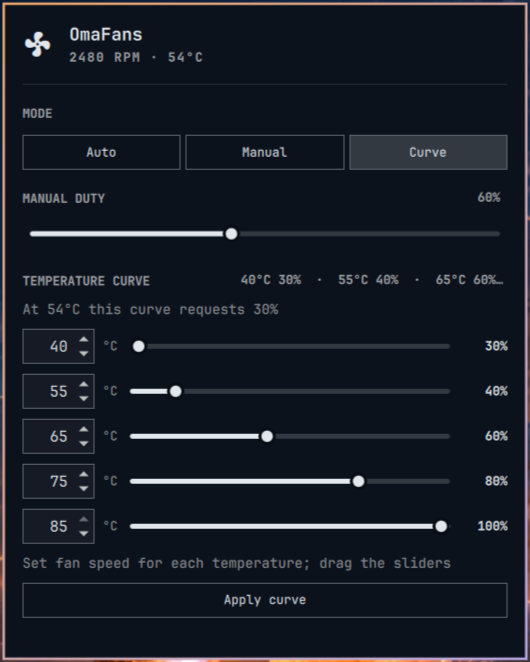
OmaFans puts a ThinkPad’s fan speed, temperature and mode in the Omarchy Quattro bar. Click it and you can leave the fan on firmware Auto, set a manual speed or use a five-point temperature curve. I built it with help from Codex and tested it on my ThinkPad T480s.
The screenshot above is the real panel, showing made-up demo readings.
Why I built it
It’s another small build for my ThinkPad T480s, the laptop I put Omarchy on and now reach for more than anything else. I wanted to see what the fan was doing at a glance and to be able to put the fans on blast when things get a bit warm inside.
I asked Codex, inside Omarchy, to make me a fan control plugin. It took a couple of tweaks to get it the way I wanted. I shared it on X with my own curve: five points, from 30% at 40°C up to 100% at 85°C. People asked whether it’s a plugin and whether it would work on a Lenovo Legion. It talks to the ThinkPad fan driver, so a Legion would need a fork, but the curve UI and the fall-back-to-Auto safety parts should be a decent starting point. That’s why I tidied it up and put it on GitHub.
What it does
- Monitoring by default. Adding the plugin only reads the sensors. It doesn’t need root, doesn’t change kernel settings and doesn’t install a service.
- Opt-in control. Fan control is a separate step. You preview the install with a dry run first, then install the daemon and reboot.
- Three modes. Auto leaves the fan to the firmware. Manual sets a target from 30 to 100%. Curve sets the speed from five temperature points.
- Falls back to Auto. Stopping the service hands control back to the firmware. If the widget stops sending its heartbeat, control returns to Auto. If a sensor reading, write or check fails, the daemon tries to return to Auto too. A kernel watchdog is armed before every manual change as a backstop.
- An overheat override. At 92°C on the ThinkPad sensor, the daemon sets the fan to its highest normal level, even with no widget running.
It uses only Python’s standard library and what Omarchy already has installed. There’s no telemetry, no network listener and no downloads at runtime. It’s MIT licensed.
How to try it
The code is on GitHub: thebytorsnowdog/OmaFans. Start with monitoring only:
omarchy plugin add https://github.com/thebytorsnowdog/OmaFans.git
omarchy plugin enable community.omafans --section right
If you want control, read the README’s warnings first, then preview and install:
cd ~/.config/omarchy/plugins/community.omafans
python3 scripts/setup.py install --user "$(id -un)" --dry-run
sudo /usr/bin/python3 -I scripts/setup.py install --user "$(id -un)" --enable-kernel-control
Then reboot. To hand the fan back to the firmware at any point, run sudo systemctl stop omafans.service.
This is experimental and only for ThinkPads. Control is only tested on a T480s. Fan control lets software override the firmware, and a bug or a bad setting could let a laptop overheat. Use it at your own risk.
What I tested, and what didn’t pass
On the T480s, these passed:
- Manual, Curve and Auto, with the settings read back from the hardware.
- Heartbeat expiry. With the widget stopped, manual control went back to Auto after about 16 seconds.
- The kernel watchdog firing while the daemon was paused.
- Stopping and restarting the service.
- One real suspend and resume. Firmware Auto stayed on throughout, and control was available again about 8 seconds after waking.
- One real reboot. The service and widget came back working, in Auto.
Sustained thermal stress has not passed. I tried full and reduced CPU load, and both runs stopped at temperature limits I’d set in advance. The fan responded, but short runs like that don’t show it cools well enough under sustained load.
The 92°C override is not a CPU limit. It reads the ThinkPad sensor, and that sensor lagged the CPU. In one test the CPU reached 96°C while the ThinkPad sensor read 70°C. The override is a safeguard on that one sensor, nothing more.
What was hard
Watchdog behaviour isn’t what I first expected. My first watchdog test assumed the fan would go back to Auto when the watchdog expired. On the T480s it kept the highest normal level it was already at. That’s how the Linux driver works. So the test was wrong, not the fan, and I rewrote it to check what really happens.
A permissions bug on first start. The daemon changed the socket’s owner before setting its permissions, which failed under its restricted sandbox. The install rolled back to my previous controller. Swapping the order fixed it without adding any extra privileges.
A sensor fault that never cleared. After one failed read, the first version stayed locked out of control even once the temperature was reading normally again. The firmware was on Auto, so it was safe, but you couldn’t use control. Version 0.1.1 clears that fault only after Auto is confirmed and three good readings in a row.
What’s next
The big gap is sustained thermal stress. After that, repeated sleep and reboot cycles, and testing on other ThinkPads. If you try it on a different model, the repo has a table of hardware results and reports are welcome.